
LinkedIn Brings GIF Reactions to Comments, Making Conversations More Dynamic
Table of Contents
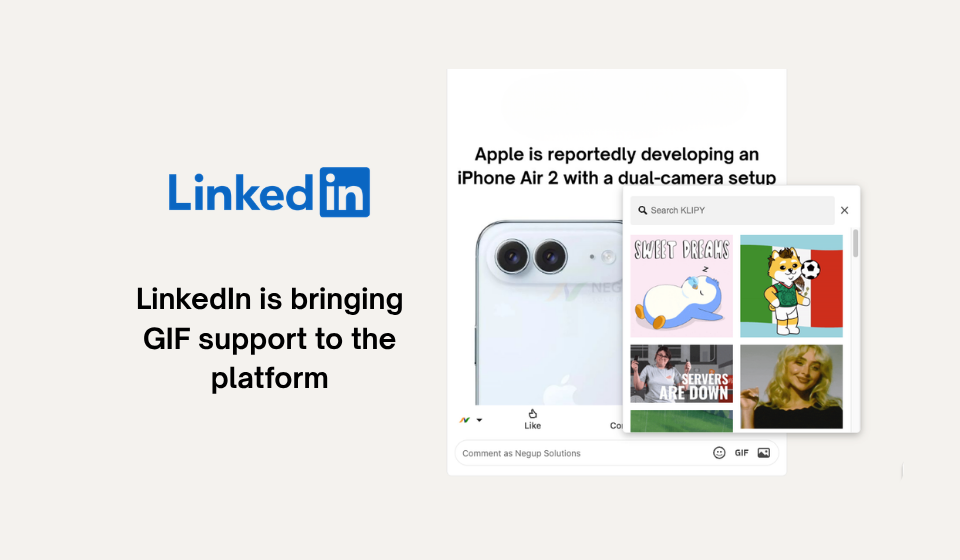
LinkedIn is expanding the ways users can interact on the platform by introducing GIF support within comments. The update allows members to respond to posts with animated images, adding a new layer of expression to discussions while maintaining the platform’s professional atmosphere.
As workplace communication becomes increasingly digital, professionals are looking for faster and more engaging ways to interact online. By enabling GIF comments, LinkedIn is embracing a communication style that has already become popular across many social media platforms.
Whether it’s celebrating a promotion, reacting to industry news, or acknowledging a colleague’s achievement, users now have a visual tool to communicate their responses more effectively.
Key Takeaways from the Update
- Users can now add GIFs directly when commenting on posts.
- The feature is available on both mobile and desktop versions of LinkedIn.
- Integrated GIF search functionality helps users find relevant reactions quickly.
- The update aims to create more engaging and expressive conversations.
How Brands and Professionals Can Benefit
The addition of GIF comments opens up new opportunities for businesses, creators, and professionals to increase engagement and strengthen relationships with their audiences.
| Feature Benefit | Business Impact |
| More Interactive Discussions | Encourages greater participation in comment sections. |
| Enhanced User Expression | Allows users to communicate emotions more effectively. |
| Faster Engagement | Enables quick and meaningful responses. |
| Improved Community Interaction | Helps create a more approachable online presence. |
Recommended Ways to Use GIFs on LinkedIn
To ensure interactions remain professional and relevant, users should be thoughtful when incorporating GIFs into conversations.
Effective Uses
- Congratulating team members and colleagues.
- Celebrating company milestones and achievements.
- Responding positively to industry developments.
- Supporting community discussions with light-hearted reactions.
Situations to Avoid
- Using GIFs in sensitive or serious professional discussions.
- Posting animations unrelated to the conversation.
- Overusing GIFs in every interaction, which may reduce their impact.
Reflecting LinkedIn’s Evolving Social Experience
The introduction of GIF comments demonstrates LinkedIn’s ongoing efforts to balance professional networking with more engaging social interactions. The platform has gradually added features that encourage authentic participation, making networking feel less formal and more community-driven.
By incorporating familiar social media elements, LinkedIn is adapting to modern communication habits while continuing to serve as a hub for career growth, industry insights, and professional connections.
Final Thoughts
LinkedIn’s GIF comment feature may be a relatively simple addition, but it has the potential to make conversations more engaging and approachable. As digital networking becomes increasingly interactive, tools that allow users to communicate with greater personality can help foster stronger relationships and encourage meaningful participation. For professionals and brands alike, this update offers a fresh way to connect with audiences while keeping discussions relevant, engaging, and professional.