

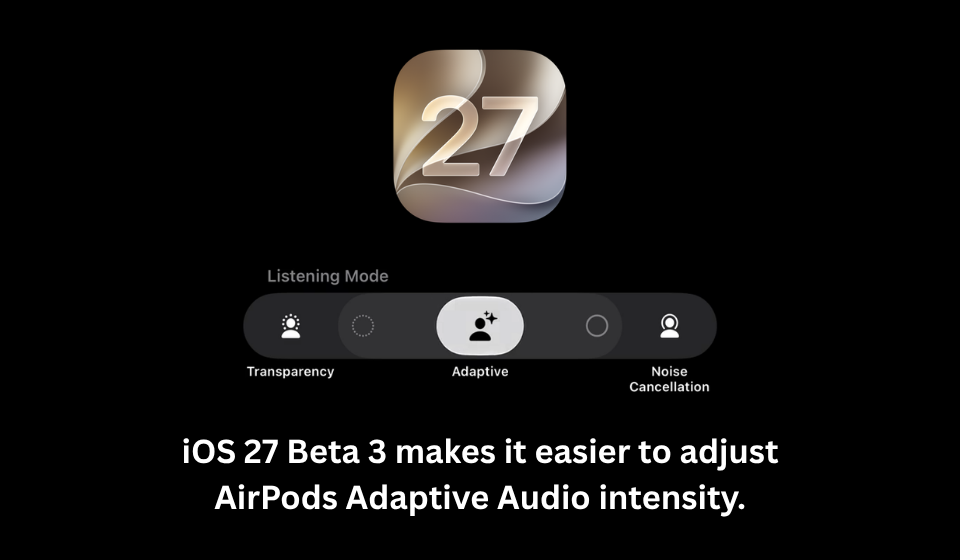
Apple Simplifies AirPods Adaptive Audio Controls in iOS 27 Beta 3
Table of Contents
Apple continues to polish the user experience in iOS 27 Beta 3 with a small but practical improvement for AirPods users. The latest beta update introduces a quicker way to adjust Adaptive Audio intensity, allowing users to fine-tune how much outside sound is allowed in without navigating through multiple settings menus.
Previously, changing Adaptive Audio levels required opening the Bluetooth settings, selecting the connected AirPods, and locating the Adaptive Audio controls. With the new update, these adjustments are now available directly within the Listening Mode menu, making the feature far more accessible during everyday use.
Users can quickly switch between different levels of ambient sound, depending on whether they prefer stronger noise cancellation or greater awareness of their surroundings. The update doesn’t introduce a new listening mode, but it significantly improves how easily existing features can be customized.
What’s New in iOS 27 Beta 3?
Apple has introduced several improvements for AirPods users:
- Adaptive Audio intensity can now be adjusted directly from the Listening Mode menu.
- Fewer steps are required to personalize noise control.
- Users can quickly choose between different ambient sound levels.
- The redesigned controls improve accessibility during daily use.
- The update focuses on convenience rather than adding new audio features.
Before and After the Update
| Feature | Earlier Experience | iOS 27 Beta 3 |
| Adaptive Audio Controls | Located inside Bluetooth settings | Available directly in Listening Mode |
| Number of Steps | Multiple menu selections | Faster access with fewer taps |
| Sound Adjustment | Hidden within settings | Easily adjustable while using AirPods |
| User Experience | Less convenient | More streamlined and intuitive |
| Personalization | Available but harder to find | Quicker and more accessible |
Why This Update Matters
Not every software update introduces major new features. Sometimes, small interface improvements can make everyday interactions much smoother. By moving Adaptive Audio controls to a more accessible location, Apple is reducing the time users spend navigating menus and making it easier to adjust audio settings based on changing environments.
Whether you’re commuting, working in a café, or walking through a busy street, being able to instantly control how much surrounding noise you hear can make AirPods more practical throughout the day. The change also reflects Apple’s continued focus on refining existing features based on usability rather than simply expanding the feature list.
Key Takeaways
- iOS 27 Beta 3 makes Adaptive Audio settings easier to access.
- AirPods users can adjust ambient sound intensity directly from the Listening Mode menu.
- The update reduces the number of steps needed to customize audio preferences.
- No new listening modes have been introduced, but existing controls are more user-friendly.
- Apple continues refining AirPods with usability-focused software improvements.
Final Thoughts
While the latest beta doesn’t introduce headline-grabbing AirPods features, it delivers a thoughtful improvement that many users will appreciate. Faster access to Adaptive Audio controls means less time navigating settings and more time enjoying a personalized listening experience. As Apple continues to refine iOS 27 ahead of its public release, enhancements like this demonstrate that even small usability updates can have a meaningful impact on everyday device interactions.