
Google Makes AI-Powered Meeting Notes More Accessible
Table of Contents
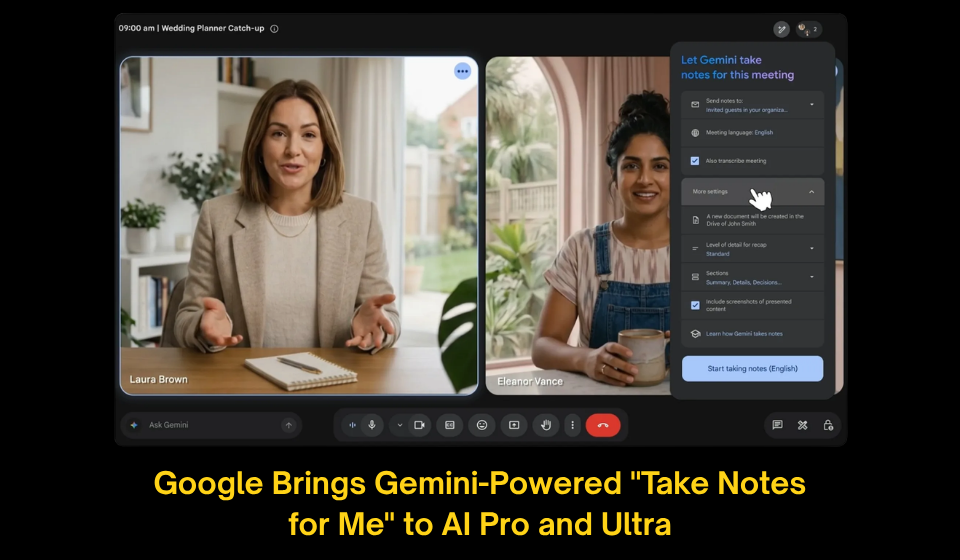
Google has expanded one of its most practical AI productivity tools by making the Gemini-powered “Take notes for me” feature available to Google AI Pro and Google AI Ultra subscribers. Previously reserved for select Google Workspace business accounts, the feature is now reaching a much broader audience, helping individuals capture meeting discussions automatically without interrupting the conversation.
Instead of manually recording every important point, users can activate Gemini before a meeting begins. The AI assistant listens throughout the session, organizes the discussion into clear notes, identifies action items, and produces a concise summary that participants can review afterward. The notes are automatically stored in Google Docs, making it easier to share information and revisit important decisions.
Key Features
The upgraded AI assistant offers several productivity benefits:
- Automatically records important meeting discussions.
- Generates organized summaries after each meeting.
- Highlights action items and responsibilities.
- Saves notes directly to Google Docs.
- Sends a recap to meeting organizers once the session ends.
- Works across desktop, Android, and iOS devices.
- Alerts participants whenever AI note-taking is enabled.
Before vs. After the Expansion
| Feature | Earlier Availability | Current Availability |
| Access | Select Google Workspace customers | Google AI Pro & AI Ultra subscribers |
| AI Meeting Summaries | Available | Available |
| Action Item Detection | Available | Available |
| Google Docs Integration | Available | Available |
| Cross-Platform Support | Limited | Desktop, Android & iOS |
| Meeting Recap | Available | Available |
Why This Update Matters
Virtual meetings have become a normal part of work, education, and remote collaboration, but taking notes while actively participating can often be challenging. Google’s latest expansion addresses this problem by allowing Gemini to handle documentation automatically, enabling participants to stay focused on discussions instead of multitasking.
The feature is especially useful for professionals managing multiple meetings each day, students attending online lectures, project teams coordinating tasks, and freelancers working with clients. By automatically organizing conversations into structured documents, Gemini helps reduce the risk of missing key decisions while improving collaboration across teams.
This rollout also reflects Google’s broader strategy of embedding Gemini across its ecosystem of productivity tools, turning AI into an everyday assistant rather than a standalone application.
Key Takeaways
- Google has expanded Gemini’s “Take notes for me” feature to AI Pro and AI Ultra subscribers.
- The AI assistant automatically creates meeting summaries and identifies follow-up tasks.
- Notes are stored in Google Docs for easy sharing and future reference.
- The feature is compatible with desktop, Android, and iOS devices.
- The update brings advanced AI productivity tools to a much larger group of Google users.
Final Thoughts
Google’s latest update demonstrates how AI is evolving from a simple chatbot into a practical workplace assistant. By automating meeting documentation, Gemini allows users to concentrate on conversations while ensuring that important information is accurately captured. As AI becomes more deeply integrated into collaboration tools, features like automated note-taking are likely to become a standard part of modern digital meetings, helping individuals and teams work more efficiently.