

Claude Code Adds Live iOS App Testing to Its macOS Application
Table of Contents
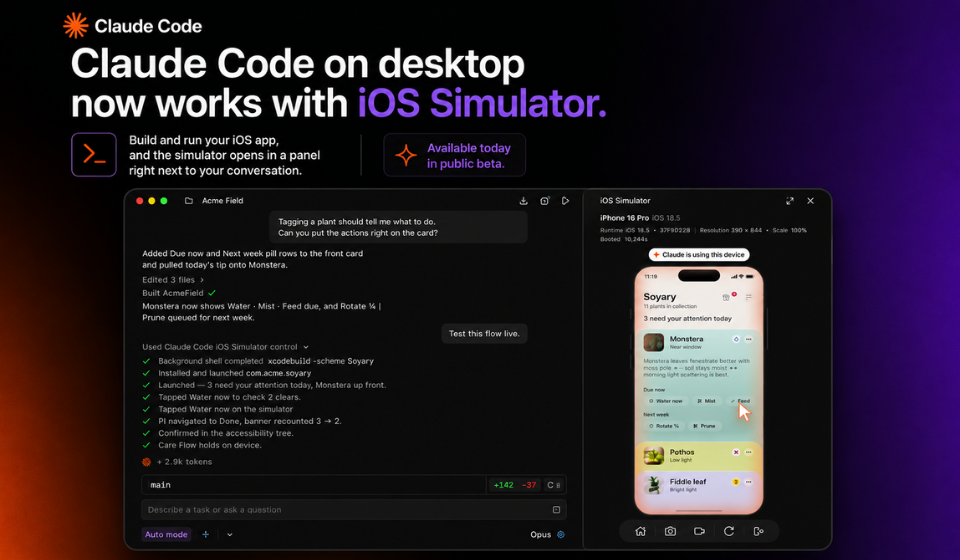
Anthropic has introduced a new capability for Claude Code on macOS that allows developers to test iOS applications directly from the desktop app. The update enables Claude Code to connect with Apple’s iOS Simulator, allowing the AI assistant to interact with apps while they are running as part of the development process.
According to the announcement, developers can ask Claude Code to launch an app in the simulator, navigate through its interface, perform interactions such as tapping buttons or entering text, and identify issues that may need attention. This functionality is designed to streamline testing by bringing AI-assisted interaction into the existing macOS development workflow.
Key Highlights
- Claude Code for macOS now supports live testing of iOS applications.
- The feature works with Apple’s iOS Simulator.
- Developers can have Claude interact with app interfaces during testing.
- The update aims to simplify app testing within the development workflow.
- The capability is available through the Claude Code desktop application.
Feature Overview
| Feature | Description |
| Platform | Claude Code for macOS |
| Testing Environment | Apple iOS Simulator |
| AI Capabilities | Launch apps, navigate screens, interact with UI elements |
| Primary Benefit | Assist developers with app testing during development |
Why This Update Matters
Testing is an essential part of iOS application development, often requiring developers to manually navigate through screens and verify app behavior. By enabling Claude Code to interact with applications running in the iOS Simulator, Anthropic is adding another layer of AI assistance to the software development process.
Rather than replacing traditional testing methods, the feature is intended to help developers complete repetitive testing tasks more efficiently while allowing them to identify interface or workflow issues during development.
Potential Benefits for Developers
Developers can use the new capability to:
- Test app navigation within the iOS Simulator.
- Interact with buttons, forms, and other interface elements.
- Observe application behavior during development.
- Incorporate AI-assisted testing into existing workflows.
- Reduce the time spent on repetitive manual interactions.
Key Takeaways
- Anthropic has added live iOS app testing to Claude Code for macOS.
- The feature integrates with Apple’s iOS Simulator.
- Claude can interact with app interfaces during testing sessions.
- The update is designed to support developers throughout the app development process.
- The enhancement expands Claude Code’s capabilities for software development.
Final Thoughts
The addition of live iOS app testing further expands Claude Code’s role as an AI-powered development assistant. By allowing developers to interact with applications running in Apple’s iOS Simulator through the desktop app, Anthropic is providing another tool that can help streamline development and testing workflows. As AI continues to become more integrated into software engineering, features like these may help developers work more efficiently while maintaining control over the testing process.