

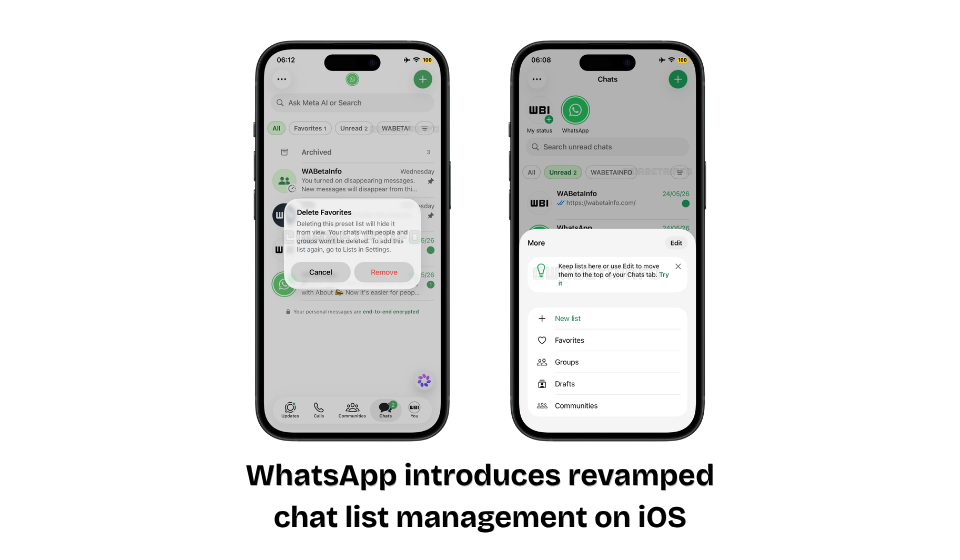
WhatsApp Introduces a Redesigned Chat Organization Experience for iPhone Users
Table of Contents
WhatsApp is rolling out a fresh update for iOS users, bringing a more streamlined and customizable way to manage conversations. As messaging habits continue to evolve, the platform is focusing on helping users organize their chats more efficiently, especially those juggling personal messages, work discussions, communities, and group conversations.
The latest redesign enhances the Chats tab by reducing clutter and giving users greater control over how their conversation lists are displayed. While the changes may appear subtle at first glance, they can significantly improve day-to-day navigation for active WhatsApp users.
What’s Changing in the New Chat Management Experience?
In previous versions of WhatsApp, chat filters and custom lists were displayed in a horizontal row at the top of the Chats screen. Although functional, the layout could become crowded as users added more custom lists and filters.
The new interface introduces a cleaner approach. Users can now decide which lists should remain visible on the main screen while moving less frequently used filters into a dedicated menu. This helps create a more organized and personalized messaging experience.
Key Improvements
- Cleaner and more organized Chats tab
- Greater control over visible chat categories
- Easier access to frequently used conversations
- Improved navigation between personal and professional chats
- New Drafts section for locating unfinished messages
Feature Overview
| Feature | Advantage |
| Customizable Chat Lists | Display only the categories you use most |
| Dedicated Filter Menu | Store secondary filters without cluttering the screen |
| Drafts Section | Quickly revisit unsent messages |
| Favorites Category | Instant access to important conversations |
| Community & Group Filters | Better management of large chat networks |
Why the Update Is Important
Messaging apps are increasingly becoming productivity tools, and WhatsApp is adapting accordingly. With users managing dozens—or even hundreds—of conversations, a more flexible organization system can make a noticeable difference.
The redesigned interface helps reduce the time spent searching for specific chats while offering a cleaner overall appearance. It also aligns with WhatsApp’s ongoing efforts to modernize its iOS experience through thoughtful design improvements and usability enhancements.
Who Benefits Most?
Business Users
- Separate client conversations from personal chats
- Access priority contacts more quickly
Students
- Organize project groups and study discussions with ease
Community Administrators
- Navigate multiple groups more efficiently
General Users
- Keep favorite conversations within easy reach
- Enjoy a less cluttered messaging environment
Availability
The redesigned chat organization interface is currently being released to iPhone users through the latest WhatsApp update. Since WhatsApp typically deploys new features gradually, some users may receive access before others. Broader availability is expected in the coming weeks.
Final Thoughts
WhatsApp’s latest iOS update focuses on something many users appreciate: simplicity. By offering more control over chat filters, reducing visual clutter, and introducing tools like the Drafts section, the platform is making conversation management more intuitive than ever. While it may not be the most headline-grabbing update, it delivers practical improvements that can enhance the daily messaging experience for millions of iPhone users.