


Table of Contents
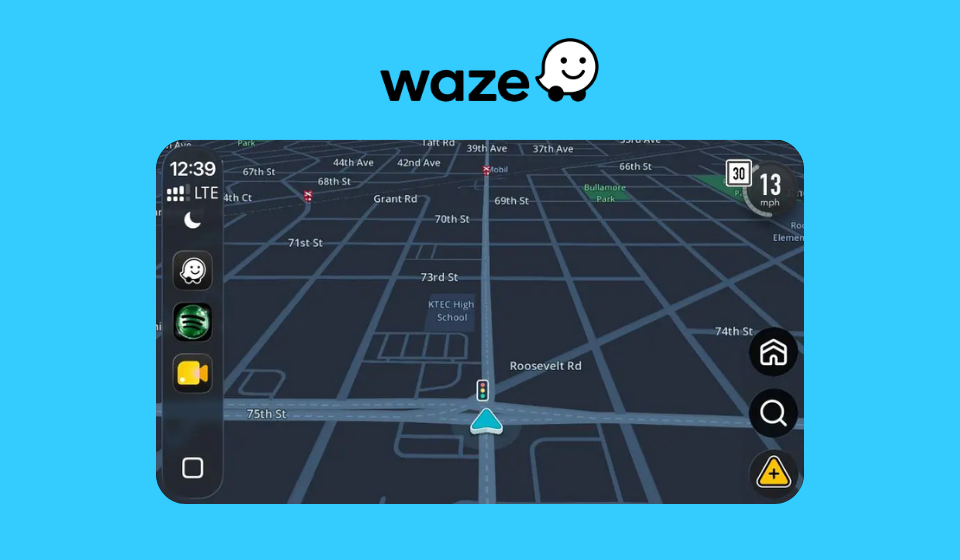
Waze is introducing a new navigation feature that allows users to see traffic lights along their driving routes. The update is designed to provide drivers with better route awareness and improve navigation experiences by highlighting intersections controlled by traffic signals.
While the feature is currently rolling out gradually and may not yet be available to all users, it represents another step toward making navigation apps more informative and context-aware.
As one of the world’s most popular community-driven navigation platforms, Waze continues to introduce features that help drivers make more informed decisions while traveling.
What Is the New Traffic Light Feature?
The latest update adds traffic light markers directly to the map interface, allowing drivers to identify signal-controlled intersections before reaching them.
Key Features
- Traffic light icons displayed on routes
- Improved intersection awareness
- Enhanced navigation visualization
- Better route planning support
- Additional driving context
- Seamless integration into existing maps
The feature is intended to help drivers better understand upcoming road conditions during navigation.
Why Traffic Light Information Matters
Traffic lights play a significant role in travel times, especially in urban environments where drivers encounter multiple intersections throughout their journeys.
Benefits for Drivers
- Improved route awareness
- Better anticipation of stops
- Enhanced navigation experience
- More informed driving decisions
- Greater familiarity with unfamiliar roads
- Improved trip planning
Although the feature does not currently provide real-time signal timing information, simply knowing where traffic lights are located can be useful for many drivers.
How the Feature Works
When available, traffic light markers appear directly on the map while users navigate.
What Users Can Expect
- Visible traffic signal icons
- Route-based display
- Easy-to-understand map integration
- Consistent navigation interface
- Minimal impact on screen clutter
The design focuses on providing useful information without overwhelming users with excessive visual elements.
Waze Traffic Light Feature Overview
| Feature | Benefit |
| Traffic Light Markers | Improved route visibility |
| Intersection Awareness | Better driving preparation |
| Route Context | Enhanced navigation insights |
| Map Integration | Easy-to-view information |
| Navigation Support | Smarter driving decisions |
Rollout Is Happening Gradually
According to reports, the traffic light feature is currently being deployed in stages.
Why Rollouts Take Time
- Regional testing requirements
- Data verification processes
- Platform optimization
- User feedback collection
- Geographic coverage expansion
As a result, some users may see the feature before others depending on location and app version.
Growing Trend Toward Smarter Navigation
Modern navigation applications are evolving beyond simple directions and increasingly focus on delivering contextual information that improves driving experiences.
Recent Navigation Trends
- Real-time traffic analysis
- Lane guidance systems
- Speed limit notifications
- Hazard alerts
- EV charging information
- Enhanced map visualization
Traffic light visibility fits naturally into this broader effort to make navigation systems more intelligent and user-friendly.
Comparison: Traditional Navigation vs Enhanced Navigation
| Traditional Navigation | Enhanced Navigation |
| Turn-by-turn directions | Additional route context |
| Basic map information | Traffic light visibility |
| Limited road insights | Better intersection awareness |
| Route-focused guidance | Richer driving information |
These enhancements help create a more comprehensive driving experience.
Key Highlights
- Waze is introducing traffic light indicators along navigation routes.
- The feature improves awareness of signal-controlled intersections.
- Rollout is currently happening gradually across regions.
- Drivers can gain better route context and navigation visibility.
- The update reflects broader trends in smart navigation technology.
Potential Benefits for Daily Commuters
For commuters who drive through busy city streets every day, understanding where traffic lights are located can help set expectations for traffic flow and travel times.
Frequent drivers may find the feature especially useful when traveling in unfamiliar areas where intersection layouts and road conditions are less predictable.
Final Thoughts
Waze’s new traffic light visibility feature may seem like a small addition, but it contributes to a richer and more informative navigation experience. By helping users identify traffic signals along their routes, the platform provides additional context that can improve driving awareness and route planning.
As navigation technology continues to evolve, features like traffic light indicators demonstrate how mapping platforms are becoming increasingly focused on delivering smarter, more helpful information to drivers. With the gradual rollout underway, more Waze users can expect access to this feature in the coming months.