


Table of Contents
Google Messages is rolling out a redesigned long-press experience that makes it easier to interact with individual messages and images. After months of testing, the updated interface is now becoming more widely available through the stable version of the app.
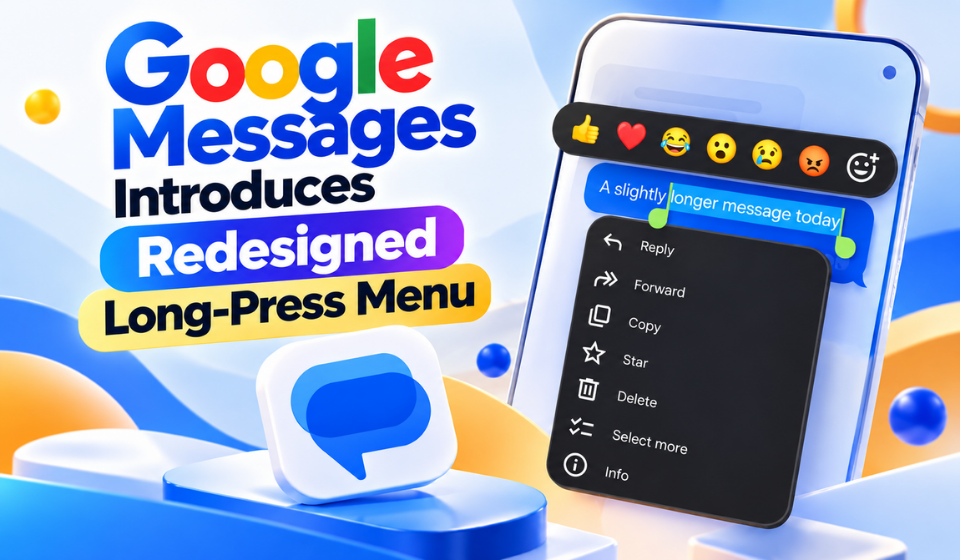
The redesigned menu replaces the previous toolbar-based layout with a floating action panel that places commonly used controls closer to the selected message.
Google Messages Replaces the Old Toolbar
Previously, selecting a message with a long press opened an action toolbar at the top of the screen. Only a limited number of controls were immediately visible, with additional actions available through an overflow menu.
The new approach moves these controls into a floating panel positioned around the selected message. This keeps the available actions closer to the content being selected.
Depending on whether the user selects text or an image, available actions can include:
- Remix for supported photos
- Reply
- Forward
- Copy
- Star
- Delete
- Select more
- Info
- Save for images
Each action is represented by an icon, making the menu easier to scan.
Google Messages Makes Text Copying More Precise
One of the more useful changes in Google Messages is the redesigned Copy function.
Instead of automatically copying the entire message, users can press and drag across the message bubble to select a specific portion of its text.
This can be particularly helpful when a long message contains only one piece of information that needs to be copied, such as an address, code, sentence or phone number.
Users can now:
- Select part of a message
- Drag across text to define a selection
- Copy specific information from longer messages
- Avoid copying unnecessary text
- Share selected details more easily
The change eliminates the need to copy an entire message and remove unwanted content manually.
New Animation and Haptic Feedback
The redesigned interaction also adds visual and tactile feedback.
When users long-press the latest message in a conversation, the selected message can move toward the centre of the screen with a subtle animation. The device can also provide haptic feedback when the selection is activated.
The rest of the conversation receives a stronger blur effect, helping the selected message and its available actions stand out.
The existing emoji row and Create Photomoji shortcuts remain unchanged. The update therefore focuses mainly on the message-selection experience rather than redesigning the entire composer.
Google Messages Update Rolls Out to More Users
The redesigned menu was first spotted during testing earlier in 2026. It is now being made available more broadly through the stable version of Google Messages.
The rollout has been observed in stable version 20260910_03_RC02. However, availability may not happen simultaneously for every user because part of the feature is controlled through Google’s server-side systems.
If the new interface does not appear after updating the application, force-stopping Google Messages through the app’s information settings and reopening it may help trigger the feature.
FAQs
What is the new Google Messages long-press menu?
It is a redesigned floating interface that appears when users press and hold a message or image. It provides access to actions such as replying, forwarding, copying, deleting and starring content.
Can I copy only part of a message in Google Messages?
Yes. With the updated interface, users can press and drag across the text to highlight a specific section before copying it.
What actions are available in the new menu?
Depending on the selected content, options can include Reply, Forward, Copy, Star, Delete, Select more, Info, Remix and Save.
Does the new Google Messages menu work with images?
Yes. Images can display options such as Remix and Save, along with other actions supported for the selected content.
Why isn’t the new menu showing on my phone?
The feature includes a server-side component, so installing the latest version does not necessarily mean the interface will appear immediately. Force-stopping and reopening the app may help activate it.
Has Google changed the Photomoji shortcuts?
No. The emoji row and Create Photomoji shortcuts remain available. The primary change concerns the interface that appears after long-pressing a message or image.
Conclusion
The latest Google Messages update introduces a more focused long-press experience without significantly changing the app’s familiar interface. Moving message actions into a floating menu keeps commonly used controls closer to the selected content.
The ability to select specific portions of a message before copying is another practical improvement, particularly for longer messages containing only a small piece of information that users need.
With additional animation, haptic feedback and clearer visual focus, Google is also making message selection feel more responsive. While the changes are relatively small, they improve several everyday interactions within Google Messages.